





How-to
How to Use Webhooks with AddToWallet
What Are Webhooks?
Webhooks allow your application to receive real-time notifications whenever a pass is added to or removed from a user's wallet. Instead of constantly checking pass activity, your server is automatically notified whenever these events occur.
A webhook is an HTTP endpoint that AddToWallet calls whenever a pass-related event occurs.
Every webhook receives notifications for both supported events:
pass-saved – Triggered when a user adds a pass to their wallet.
pass-removed – Triggered when a user removes a pass from their wallet.
There is no need to subscribe to individual events separately.
1 : Create a Webhook
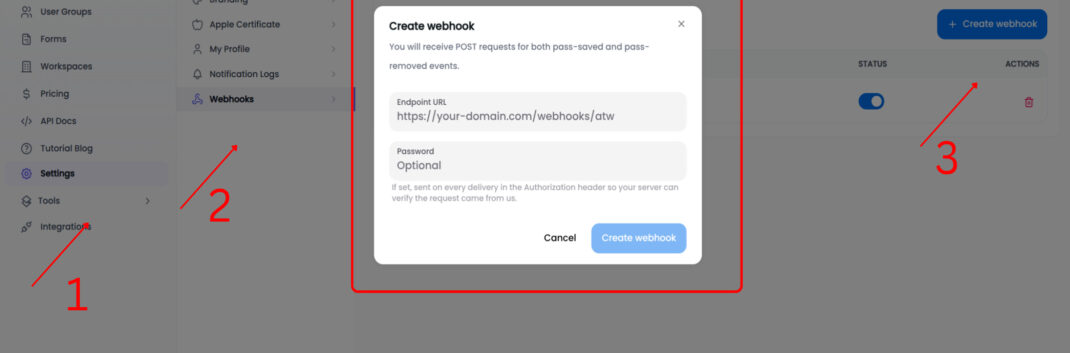
- Navigate to Sidebar, click Settings, then select Webhooks and create a new webhook.
- You'll need to provide:
- A webhook URL
- An optional password for request verification
Example webhook URL:
https://your-domain.com/webhooks/atw
Once created, AddToWallet will begin sending pass activity notifications to this endpoint.
2: Understand the Webhook Payload
Whenever a pass is saved or removed, AddToWallet sends an HTTP POST request containing a JSON payload.
Example Payload:
{
"eventType": "pass-saved",
"passid": "665f0c2a9b1e4d0012abcd34"
}
Understand the Webhook Payload
| Field | Description |
|---|---|
eventType |
The event that occurred. Possible values are pass-saved and pass-removed. |
passid |
The unique identifier of the pass associated with the event. |
3: Verify Incoming Requests
For added security, you can set a password when creating a webhook.
When configured, AddToWallet sends the password in the Authorization header of every webhook request.
Example:
Authorization: your-secret-password
On your server, compare the incoming Authorization header with your stored password and reject requests that don't match.
Important
The password verifies the sender's identity but does not encrypt or digitally sign the request body.
Conclusion
Webhooks provide a simple way to receive real-time pass activity updates from AddToWallet. By handling the pass-saved and pass-removed events on your server, you can automate workflows, update databases, trigger notifications, and build powerful integrations with your wallet passes.